
How to Prepare Your Shopify Store for OpenAI Ads
- 13 Jul, 2026
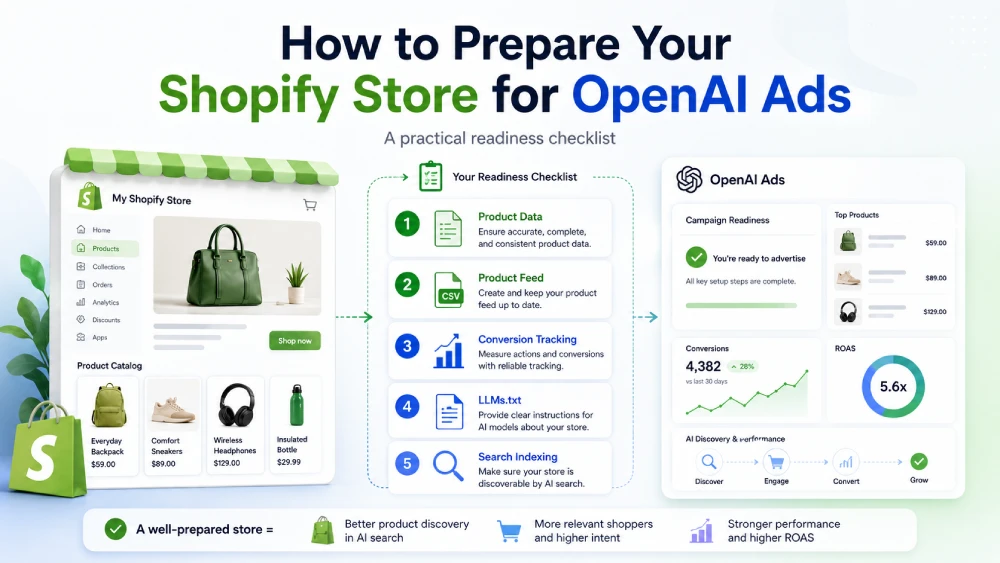
OpenAI Ads is creating a new opportunity for merchants to reach shoppers as they discover products, compare options, and make purchase decisions in ChatGPT.
For Shopify merchants, the most important question is simple:
Is your product catalog ready?
OpenAI Ads product-feed campaigns rely on structured product data. OpenAI describes product feeds as merchant catalogs used to create and measure product-feed ads, including product details such as titles, descriptions, prices, availability, images, and destination URLs. You can read more in OpenAI’s official product feed documentation.
In this guide, we’ll walk through how to prepare your Shopify store for OpenAI Ads — including product data, feed readiness, conversion tracking, LLMs.txt, and real-time search discovery.
1. Make Sure Your Product Data Is Complete
Your product feed is only as strong as the product data inside your Shopify store.
Before preparing for OpenAI Ads, review the basics:
-
Product titles
-
Product descriptions
-
Prices
-
Availability
-
Product images
-
Product URLs
-
Product categories or types
-
Variant information
-
Inventory status
OpenAI Ads product-feed campaigns need clear, structured product data to understand what each product is and whether it should be eligible for ads.
If your catalog contains missing titles, weak descriptions, outdated prices, broken images, or unavailable products, those issues can carry into your feed.
Start by cleaning up your Shopify product data.
2. Improve Product Titles and Descriptions
Product titles and descriptions are especially important because they help explain what each item is.
A good product title should be clear, specific, and useful to shoppers.
For example:
Weak title:
Green Bag
Better title:
Green Leather Tote Bag with Zipper Closure
A good product description should explain the product’s key details, such as:
-
What the product is
-
Who it is for
-
Important materials or specifications
-
Size, color, or variant details
-
Use cases
-
Benefits
-
Any important limitations
OpenAI Ads product-feed campaigns may use product information directly from your feed, so accurate and useful product copy matters.
3. Use High-Quality Product Images
Images are another important part of product feed readiness.
Your Shopify product images should be:
-
Clear
-
High quality
-
Relevant to the product
-
Consistent with the product being advertised
-
Free from broken or outdated image URLs
For ecommerce ads, the image often does a lot of the selling. If the product image is poor, unclear, or mismatched, the product may be less effective in campaign previews and ad placements.
Review your most important products first, especially bestsellers, seasonal products, and products you may want to advertise.
4. Keep Prices and Availability Current
Product feeds should reflect the current state of your catalog.
OpenAI’s product-feed documentation says merchants should keep the catalog current as products, prices, and availability change, and notes that ads eligibility does not guarantee that a product will serve. (OpenAI product feed documentation)
For Shopify merchants, this means your feed should stay aligned with:
-
Current product prices
-
Sale prices
-
Inventory availability
-
Product status
-
Variant-level availability
-
Product URLs
If a shopper clicks an ad and lands on a product that is out of stock, incorrectly priced, or unavailable, the experience suffers.
That is why automated feed updates are important.
5. Generate an OpenAI Ads-Compatible Product Feed
Once your Shopify catalog is clean, the next step is generating a product feed in a format compatible with OpenAI Ads product-feed campaigns.
A product feed acts as a bridge between your Shopify catalog and the OpenAI Ads workflow.
It helps provide product data such as:
-
Titles
-
Descriptions
-
Prices
-
Availability
-
Images
-
Destination URLs
-
Product metadata
OpenAI’s help documentation says product feeds must comply with the feed specification and be uploaded through SFTP. It also notes that Ads Manager generates SFTP connection details after a feed is created. You can read more in OpenAI’s help article on creating campaigns from product feeds.
For merchants, this means feed preparation is not just a one-time export. The feed needs to stay current as your catalog changes.
6. Prepare for the OpenAI Ads Feed Workflow
OpenAI’s product-feed campaign workflow includes creating a feed in Ads Manager, uploading the feed, waiting for processing, creating a product-feed campaign, selecting products, creating an ad template, and reviewing the campaign before launch.
You do not need to handle every detail manually before you are approved, but you should understand the general workflow:
-
Prepare your Shopify product data
-
Generate a compatible product feed
-
Keep the feed updated
-
Create or access your feed connection in OpenAI Ads Manager
-
Connect or upload the feed through the OpenAI Ads workflow
-
Validate the feed
-
Create product-feed campaigns when ready
This preparation can reduce feed-related setup work once your OpenAI Ads account is approved.
7. Enable Conversion Tracking
Product feed readiness prepares the catalog side.
Conversion tracking prepares the measurement side.
OpenAI Ads supports conversion events such as checkout starts, content views, cart additions, purchases, and page views. OpenAI’s supported events documentation includes ecommerce-related events such as checkout_started, contents_viewed, items_added, order_created, and page_viewed. (OpenAI supported events documentation)
For Shopify merchants, conversion tracking can help answer questions like:
-
Which ads are driving purchases?
-
Which products are converting?
-
Which campaigns are generating revenue?
-
Which shopper actions are happening after ad interactions?
-
How should campaigns be optimized?
A product feed tells OpenAI Ads what products can be advertised.
Conversion tracking helps measure what happens after shoppers interact with ads.
You should prepare both.
8. Add LLMs.txt for AI Readiness
OpenAI Ads is only one part of the AI commerce landscape.
AI crawlers and AI-powered tools may use structured signals to better understand what your store sells and which pages are important.
That is where LLMs.txt can help.
For Shopify merchants, LLMs.txt can provide a structured overview of important store content, such as product categories, collections, and key pages.
It does not guarantee rankings, recommendations, or visibility. But it can support better AI readiness by helping AI systems understand your store more clearly.
9. Use IndexNow for Faster Search Discovery
While OpenAI Ads prepares your store for AI-powered advertising, search engines still matter.
When you add or update products, collections, or pages, search engines need to discover those changes.
IndexNow helps notify supported search engines like Bing when URLs change, helping them discover updates faster.
For Shopify stores, this can be useful when:
-
New products are added
-
Product descriptions are updated
-
Products go out of stock
-
Products come back in stock
-
Collections change
-
Landing pages are updated
IndexNow does not guarantee instant indexing or rankings, but it can help supported search engines discover updates more quickly.
10. Understand What Preparation Does Not Guarantee
Preparing your Shopify store for OpenAI Ads is important, but it is not the same as being approved or guaranteed ad delivery.
Keep these points in mind:
-
OpenAI controls Ads program access and approval.
-
Product feed readiness does not guarantee approval.
-
Ads eligibility does not guarantee that a product will serve.
-
Product-feed campaigns are separate from organic ChatGPT product discovery.
-
Feed quality, campaign setup, budget, targeting, and approval all matter.
The goal is readiness: making sure your catalog, feed, tracking, and AI signals are prepared when you are able to connect.
How IndexNow: OpenAI Ads & LLMs Helps
IndexNow: OpenAI Ads & LLMs helps Shopify merchants prepare for OpenAI Ads and AI commerce from one app.
The app supports:
-
OpenAI Ads product feeds
Generate an OpenAI Ads-compatible product feed from your Shopify catalog. -
Feed updates
Keep your feed aligned as products, prices, inventory, and availability change. -
Feed submission readiness
Prepare your product feed for the OpenAI Ads workflow once your Ads Manager connection is available. -
Conversion tracking
Help measure purchases and other key store events from OpenAI Ads campaigns. -
LLMs.txt generation
Maintain a structured file that helps AI crawlers understand your store. -
IndexNow submissions
Notify Bing and other IndexNow-enabled search engines when store content changes.
Instead of managing separate tools for product feeds, AI crawler readiness, conversion tracking, and search discovery, you can prepare everything from one app.
Shopify OpenAI Ads Readiness Checklist
Here is a quick checklist you can use:
-
Product titles are clear and specific
-
Product descriptions are complete and accurate
-
Product images are high quality
-
Prices are current
-
Inventory and availability are accurate
-
Product URLs are correct
-
Your product feed is OpenAI Ads-compatible
-
Your feed stays updated as your catalog changes
-
Conversion tracking is configured
-
LLMs.txt is generated and maintained
-
IndexNow submissions are active for product, collection, and page updates
If you can check these off, your Shopify store is in a stronger position for OpenAI Ads and emerging AI commerce workflows.
Prepare Your Shopify Catalog for OpenAI Ads
OpenAI Ads creates a new product-feed opportunity for Shopify merchants.
To prepare, focus on the fundamentals:
-
Clean product data
-
Accurate pricing and availability
-
OpenAI Ads-compatible product feeds
-
Conversion tracking
-
LLMs.txt
-
Real-time IndexNow submissions
With IndexNow: OpenAI Ads & LLMs, you can prepare your product feed, conversion tracking, LLMs.txt, and IndexNow submissions from one app.
Learn more on our OpenAI Ads Product Feeds for Shopify page or install the app from the Shopify App Store.
Related Articles