
How to Prepare Your BigCommerce Store for OpenAI Ads
- 14 Jul, 2026
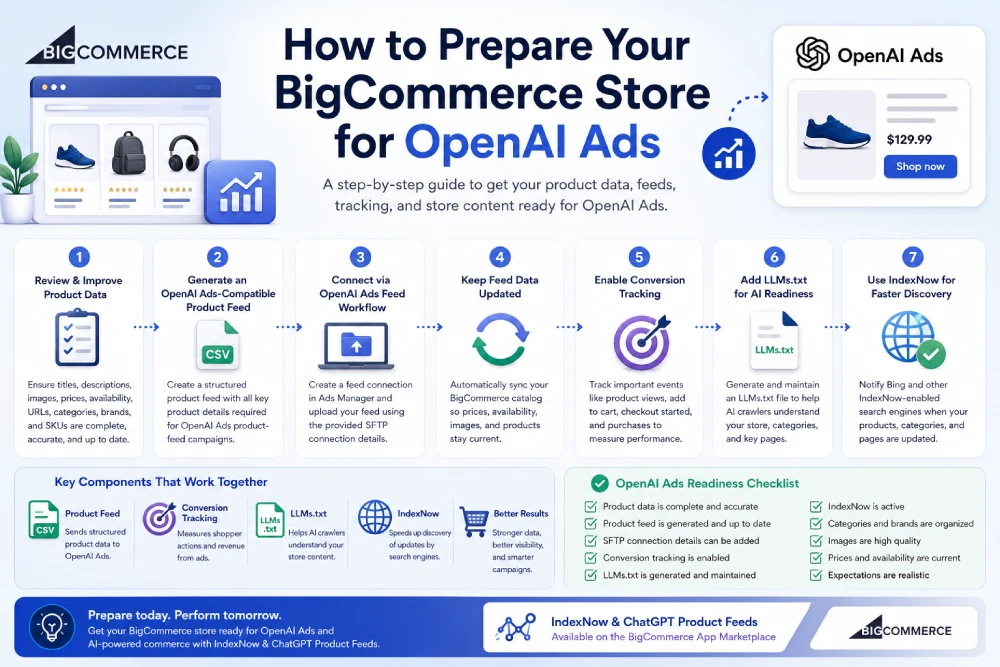
OpenAI Ads gives ecommerce merchants a new way to prepare for AI-powered shopping and advertising.
For BigCommerce merchants, the opportunity starts with your product catalog.
Your catalog already contains the information shoppers and advertising systems need: product titles, descriptions, prices, images, availability, categories, brands, and product URLs.
But having product data is not enough.
That data needs to be complete, structured, current, and ready for product-feed workflows.
In this guide, we’ll walk through how to prepare your BigCommerce store for OpenAI Ads, what product data to review, why conversion tracking matters, and how IndexNow & ChatGPT Product Feeds helps automate product feeds, LLMs.txt, and IndexNow submissions from one app.
1. Make Sure Your Product Data Is Complete
OpenAI Ads product-feed campaigns depend on structured catalog data.
That means your BigCommerce products should have the core fields needed for product discovery and advertising workflows.
Start by reviewing:
-
Product titles
-
Product descriptions
-
Product images
-
Prices
-
Sale prices
-
Availability
-
Product URLs
-
Categories
-
Brands
-
SKUs or product identifiers
-
Product options or variants
-
Product metadata
A product feed can only be as strong as the data behind it.
If important product details are missing, vague, or outdated, your feed may be less useful.
Before thinking about ads, make sure your catalog clearly explains what you sell.
2. Improve Product Titles
Product titles are one of the most important parts of your catalog.
They help shoppers understand products quickly, and they help advertising systems interpret what each product is.
Avoid vague product names such as:
Running Shoe
A better title would be:
Men's Lightweight Trail Running Shoe - Black
The better title gives more context.
It includes:
-
Product type
-
Intended customer
-
Use case
-
Style or attribute
For BigCommerce stores, product titles should be clear enough to make sense outside your website.
A shopper or AI-powered system should be able to understand the product without needing to inspect your full category structure.
3. Write Clear Product Descriptions
Product descriptions should explain what the product is, who it is for, and why someone might buy it.
A strong description can include:
-
Main product benefits
-
Materials or ingredients
-
Size, fit, or dimensions
-
Use cases
-
Compatibility details
-
Care instructions
-
What is included
-
Important limitations
Avoid descriptions that are too short, too generic, or copied across many products.
For example, a description like:
Great backpack for daily use.
is less useful than:
A water-resistant 20L everyday backpack with padded laptop storage, adjustable straps, and interior organization pockets for work, school, and travel.
Clear product descriptions help shoppers.
They also make your product data more useful for product feeds, AI commerce workflows, and advertising platforms.
4. Use Accurate, High-Quality Product Images
Product images are a major part of ecommerce decision-making.
They can also be used in product-feed ad workflows.
Before preparing your BigCommerce store for OpenAI Ads, review your images.
Make sure they are:
-
Accurate
-
High quality
-
Current
-
Not broken
-
Not outdated
-
Representative of the actual product
-
Consistent with your product page
Product images should not misrepresent color, size, packaging, or included accessories.
If your catalog includes old images, placeholder images, or missing images, fix those before relying on a product feed.
5. Keep Prices and Availability Current
Product feeds need current catalog data.
That includes prices and availability.
If your feed says a product is in stock, but the product is unavailable on your BigCommerce store, that creates a bad shopper experience.
The same is true for pricing.
Outdated pricing can lead to confusion, lower trust, and poor campaign performance.
Review:
-
Regular prices
-
Sale prices
-
Inventory status
-
Out-of-stock products
-
Discontinued products
-
Product variants
-
Products with hidden or inactive pages
Your OpenAI Ads product feed should stay aligned with your actual BigCommerce catalog.
This is why automatic feed updates matter.
A feed that is generated once and forgotten can become outdated quickly.
6. Organize Categories and Brands
BigCommerce stores often rely on categories and brands to organize products.
That structure can also help your catalog make sense in product-feed and AI commerce workflows.
Review your category and brand setup.
Ask:
-
Are products assigned to the right categories?
-
Are category names clear?
-
Are brand names consistent?
-
Are duplicate or outdated categories still active?
-
Are important categories missing?
-
Do category pages contain useful copy?
Organized categories and brands make your store easier to understand.
They also help shoppers navigate your store and help product data communicate more clearly.
7. Generate an OpenAI Ads-Compatible Product Feed
Once your catalog data is in good shape, the next step is creating a compatible product feed.
A product feed is a structured catalog file that includes product details such as titles, descriptions, prices, availability, images, and destination URLs.
For BigCommerce merchants, this feed becomes the catalog layer for OpenAI Ads product-feed workflows.
It helps OpenAI Ads understand:
-
What products exist
-
What each product is called
-
How each product is described
-
What each product costs
-
Whether each product is available
-
Which image represents the product
-
Where shoppers should go to view or buy it
A compatible feed does not guarantee OpenAI Ads approval, ad delivery, clicks, or sales.
It means your catalog is technically prepared for the product-feed workflow.
8. Prepare for the OpenAI Ads Feed Workflow
OpenAI Ads product-feed campaigns use a feed connection inside Ads Manager.
After your account has access and your feed connection is created, Ads Manager provides SFTP connection details.
Your product feed is then uploaded through that SFTP connection.
For merchants, this means preparation includes more than creating a file.
You also need a workflow for:
-
Generating the feed
-
Keeping the feed updated
-
Entering SFTP connection details
-
Uploading the feed
-
Updating catalog data when products change
-
Making sure availability and prices stay current
This is where automation can save time.
A BigCommerce merchant should not have to manually rebuild and upload a product feed every time a product changes.
9. Enable Conversion Tracking
Product feeds help OpenAI Ads understand your catalog.
Conversion tracking helps measure what happens after shoppers interact with ads.
For ecommerce stores, conversion tracking may help measure actions such as:
-
Page views
-
Product views
-
Add-to-cart actions
-
Checkout starts
-
Purchases
-
Revenue
This matters because advertising is not only about showing products.
It is also about understanding performance.
Conversion tracking can help answer questions like:
-
Are ads driving purchases?
-
Which products are converting?
-
Which campaigns are producing revenue?
-
Are shoppers adding products to cart?
-
Are shoppers completing checkout?
For BigCommerce merchants preparing for OpenAI Ads, conversion tracking should be part of the setup, not an afterthought.
10. Add LLMs.txt for AI Readiness
OpenAI Ads product feeds are important, but they are not the only part of AI commerce readiness.
LLMs.txt can also help AI crawlers understand your store.
An LLMs.txt file provides a structured overview of important website content.
For a BigCommerce store, that may include:
-
Store overview
-
Main product categories
-
Important brand pages
-
Buying guides
-
Shipping and return pages
-
Contact or support pages
-
Key store resources
LLMs.txt does not guarantee ChatGPT visibility, search rankings, or OpenAI Ads approval.
It is not a replacement for product feeds.
But it can help organize important store context in a format AI systems may find easier to process.
That makes it useful as part of a broader AI readiness strategy.
11. Use IndexNow for Faster Search Discovery
BigCommerce stores change often.
Products are added. Prices change. Inventory changes. Categories are updated. Pages are edited.
IndexNow helps notify supported search engines like Bing when important URLs change.
That can include:
-
Product pages
-
Category pages
-
Brand pages
-
Store pages
-
Blog posts
IndexNow does not guarantee instant indexing or higher rankings.
Search engines still decide whether to crawl, index, and rank each page.
But IndexNow can help supported search engines discover updates faster.
For BigCommerce merchants, that makes it a helpful complement to product feeds and LLMs.txt.
Product feeds support catalog-based commerce workflows.
LLMs.txt supports AI store understanding.
IndexNow supports faster search discovery for updated URLs.
12. Understand What Preparation Does Not Guarantee
Preparation is important, but expectations need to be realistic.
Preparing your BigCommerce store for OpenAI Ads does not guarantee:
-
OpenAI Ads approval
-
Ad delivery
-
Product impressions
-
Product clicks
-
Sales
-
Organic ChatGPT product visibility
-
Higher search rankings
-
Instant indexing
OpenAI controls Ads access, account approval, campaign review, product eligibility, and ad delivery.
Search engines control crawling, indexing, ranking, and search visibility.
A product feed helps make your catalog ready.
Conversion tracking helps measure performance.
LLMs.txt helps AI crawlers understand your store.
IndexNow helps supported search engines discover changes faster.
None of these guarantees outcomes by itself.
They help build a stronger technical foundation.
How IndexNow & ChatGPT Product Feeds Helps
IndexNow & ChatGPT Product Feeds helps BigCommerce merchants prepare for OpenAI Ads and AI commerce workflows from one app.
The app supports:
-
OpenAI Ads-compatible product feeds
Generate structured product feeds from your BigCommerce catalog. -
ChatGPT product feed readiness
Help prepare product data for OpenAI-related product discovery workflows. -
Automatic feed updates
Keep product feed data aligned as products, prices, images, and availability change. -
Feed submission workflow
Add OpenAI Ads feed connection details once your Ads account is approved. -
Conversion tracking
Support measurement for purchases and other key store events from OpenAI Ads campaigns. -
LLMs.txt generation
Generate and maintain a structured LLMs.txt file to help AI crawlers understand your store. -
IndexNow submissions
Notify Bing and other IndexNow-enabled search engines when products, categories, brands, or pages change.
This gives merchants a practical way to prepare for OpenAI Ads while also improving AI readiness and search discovery.
BigCommerce OpenAI Ads Readiness Checklist
Use this checklist before connecting your catalog to OpenAI Ads workflows:
-
Product titles are clear and descriptive
-
Product descriptions are complete and useful
-
Product images are accurate and high quality
-
Prices are current
-
Sale prices are accurate
-
Inventory and availability are up to date
-
Product URLs are active
-
Categories are organized
-
Brands are consistent
-
Product metadata is useful
-
Product feed data can be generated automatically
-
Feed updates stay aligned with catalog changes
-
OpenAI Ads SFTP connection details can be added when approved
-
Conversion tracking is available
-
LLMs.txt is generated and maintained
-
IndexNow submissions are active for product, category, brand, and page updates
-
Expectations are realistic and do not depend on guaranteed approval, rankings, or visibility
A prepared store is easier to connect, easier to measure, and easier for AI-powered systems to understand.
Prepare Your BigCommerce Catalog for OpenAI Ads
OpenAI Ads creates a new reason for BigCommerce merchants to clean up product data, structure their catalog, and prepare for product-feed advertising workflows.
The foundation is simple:
Your product data should be complete.
Your feed should stay current.
Your conversion tracking should be ready.
Your store should be understandable to AI crawlers.
Your updated URLs should be discoverable by supported search engines.
With IndexNow & ChatGPT Product Feeds, BigCommerce merchants can generate OpenAI Ads-compatible product feeds, support conversion tracking, maintain LLMs.txt, and automate IndexNow submissions from one app.
Learn more on our OpenAI Ads Product Feeds for BigCommerce page or install the app from the BigCommerce App Marketplace.
Related Articles