
OpenAI Ads Product Feed vs Pixel: What’s the Difference?
- 13 Jul, 2026
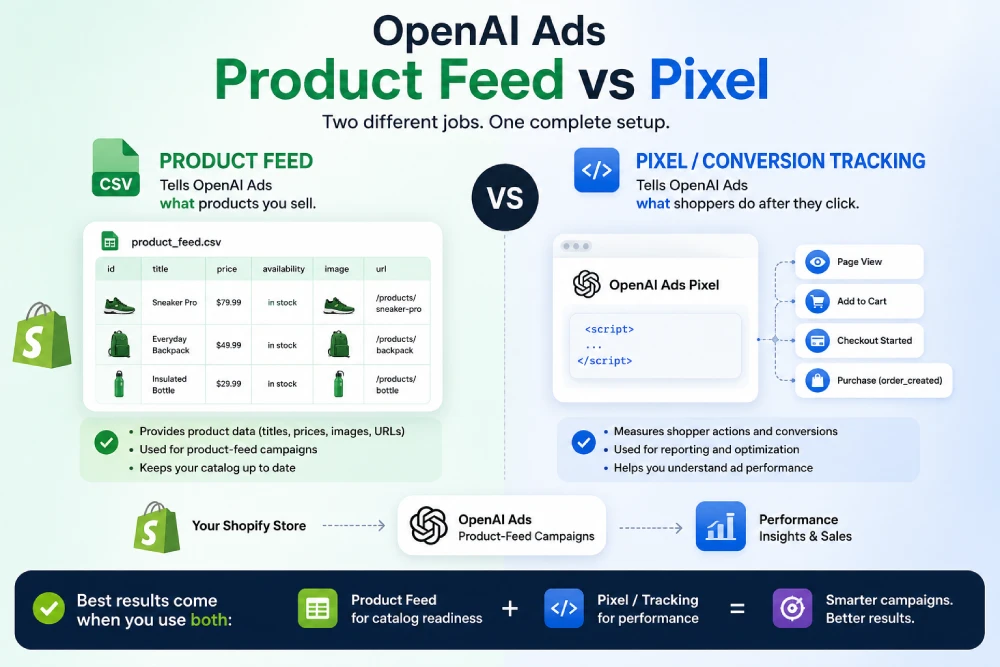
As OpenAI Ads becomes a new opportunity for ecommerce merchants, Shopify store owners are starting to hear two related terms more often:
Product feed and pixel.
They sound technical, but the difference is simple.
A product feed tells OpenAI Ads what products you sell.
A pixel or conversion tracking setup helps measure what shoppers do after they interact with your ads.
For Shopify merchants preparing for OpenAI Ads, both are important — but they solve different problems.
In this guide, we’ll explain the difference between an OpenAI Ads product feed and a pixel, why each matters, and how IndexNow: OpenAI Ads & LLMs helps Shopify stores prepare both sides of the workflow.
What Is an OpenAI Ads Product Feed?
An OpenAI Ads product feed is a structured catalog of your store’s products.
It includes product information such as:
-
Product titles
-
Product descriptions
-
Prices
-
Availability
-
Product images
-
Destination URLs
-
Product metadata
The goal of the feed is to give OpenAI Ads the product data it needs for product-feed campaigns.
Instead of manually creating an ad for every product, the feed lets OpenAI Ads read your catalog and use eligible products in ad placements.
OpenAI’s product-feed documentation describes a product feed as a merchant catalog that keeps product details like titles, descriptions, prices, availability, images, and destination URLs up to date. You can read more in OpenAI’s official documentation on product feeds.
For Shopify merchants, the product feed is the catalog side of OpenAI Ads readiness.
What Is an OpenAI Ads Pixel?
A pixel is part of conversion tracking.
In advertising, a pixel usually means a small tracking script or measurement setup that helps record important actions on your store, such as:
-
Page views
-
Product views
-
Add-to-cart events
-
Checkout starts
-
Purchases
-
Leads or signups
For OpenAI Ads, conversion tracking helps merchants understand what happens after someone interacts with an ad.
For example, if a shopper clicks an OpenAI Ads placement and later completes a purchase, conversion tracking helps connect that purchase back to the ad campaign.
This is the measurement side of OpenAI Ads readiness.
Product Feed vs Pixel: The Simple Difference
The easiest way to understand the difference is this:
The product feed powers what can be advertised.
The pixel or conversion tracking measures what happens after the ad interaction.
Here’s a simple comparison:
| Feature | Product Feed | Pixel / Conversion Tracking |
|---|---|---|
| Main purpose | Provides product catalog data | Measures shopper actions |
| Tells OpenAI Ads | What products you sell | What users do after interacting |
| Includes | Titles, prices, images, availability, URLs | Purchases, page views, checkout events |
| Helps with | Product-feed campaigns | Attribution and performance measurement |
| Shopify merchant benefit | Catalog readiness | Campaign reporting and optimization |
A product feed without conversion tracking can prepare your catalog, but it may be harder to measure campaign performance.
Conversion tracking without a product feed can help measure events, but it does not provide the product catalog needed for product-feed campaigns.
For merchants preparing for OpenAI Ads, the strongest setup includes both.
Why Product Feeds Matter for Shopify Stores
Shopify already stores your product data: titles, descriptions, images, prices, variants, inventory, and URLs.
But advertising platforms usually need that data in a specific feed format.
That is where product feed preparation becomes important.
A product feed helps make your Shopify catalog readable for OpenAI Ads product-feed workflows. It keeps product information organized, structured, and ready for campaign setup when your OpenAI Ads account is approved.
A good product feed should be:
-
Accurate
-
Complete
-
Properly formatted
-
Updated as your catalog changes
-
Aligned with current product availability and pricing
For stores with large catalogs or frequent product updates, manually maintaining this data can quickly become difficult.
That is why automated feed generation and updates matter.
Why Conversion Tracking Matters
Product feeds help OpenAI Ads understand your catalog.
Conversion tracking helps you understand performance.
Without conversion tracking, merchants may struggle to answer questions like:
-
Which ads are driving purchases?
-
Which products are converting?
-
Which campaigns are producing revenue?
-
Are shoppers completing checkout after clicking?
-
Which store events should be optimized?
OpenAI Ads supports conversion measurement for key events, including ecommerce actions such as completed orders, checkout starts, content views, and other customer actions. You can read more in OpenAI’s documentation on supported events.
For Shopify merchants, conversion tracking is what turns ad activity into measurable business data.
Do You Need Both?
For product-feed campaigns, yes — merchants should think about both.
The product feed helps prepare your catalog for OpenAI Ads.
Conversion tracking helps measure what happens after ad interactions.
They work together:
-
The feed supplies the products.
-
The campaign uses eligible products.
-
The tracking measures results.
-
The data helps you understand performance.
If you only set up a pixel, your store may still be missing the product-feed workflow.
If you only set up a feed, you may still be missing the measurement layer needed to understand performance.
A complete OpenAI Ads setup should prepare both the catalog side and the tracking side.
Where SFTP Fits In
Product feeds are usually transferred through a feed connection.
OpenAI’s documentation explains that product-feed campaigns use the Feeds area in Ads Manager and that merchant catalogs are uploaded through the SFTP location shown there.
That means Shopify merchants need a way to prepare the feed and keep it ready for the OpenAI Ads feed workflow.
This is different from adding a pixel or tracking script.
The feed is the catalog file.
The pixel or conversion tracking is the measurement setup.
They are connected to the same advertising goal, but they are not the same thing.
How IndexNow: OpenAI Ads & LLMs Helps
IndexNow: OpenAI Ads & LLMs helps Shopify merchants prepare both sides of the OpenAI Ads workflow.
The app supports:
-
OpenAI Ads product feed generation
Create an OpenAI Ads-compatible product feed from your Shopify catalog. -
Automatic feed updates
Keep product data aligned as your catalog changes. -
OpenAI Ads feed readiness
Prepare your feed for the OpenAI Ads workflow once your Ads Manager connection is available. -
Conversion tracking
Help measure purchases and other key store events from OpenAI Ads campaigns. -
LLMs.txt generation
Maintain a structured LLMs.txt file to support AI crawler understanding. -
IndexNow submissions
Notify Bing and other IndexNow-enabled search engines when products, collections, or pages change.
This makes the app more than a pixel tool and more than a feed tool. It helps prepare your Shopify store for search visibility, AI discovery, and OpenAI Ads readiness from one place.
Common Misunderstandings
“A pixel is enough for OpenAI Ads.”
Not necessarily.
A pixel or conversion tracking setup helps measure performance, but it does not provide your product catalog for product-feed campaigns.
If you want to prepare your catalog for OpenAI Ads product-feed workflows, you need a compatible product feed.
“A product feed replaces conversion tracking.”
No.
A product feed provides product data. Conversion tracking measures shopper actions and campaign results.
They work together, but they do different jobs.
“Shopify already has my products, so I don’t need a feed.”
Shopify stores your product catalog, but OpenAI Ads product-feed campaigns need product data in a compatible format and workflow.
A feed bridges the gap between your Shopify catalog and the ad platform.
“A compatible feed guarantees approval or ad delivery.”
No.
OpenAI controls Ads program access, campaign eligibility, and ad delivery. A compatible feed helps with technical readiness, but it does not guarantee approval, impressions, clicks, or sales.
Product Feed vs Pixel: Which Should You Set Up First?
If you are preparing for OpenAI Ads product-feed campaigns, start with the product feed.
The feed is the foundation for catalog-based advertising. It defines which products are available, what information is sent, and whether your product data is ready for the OpenAI Ads workflow.
Then make sure conversion tracking is in place so you can measure campaign performance once ads are running.
A practical order for Shopify merchants is:
-
Prepare your product data
-
Generate an OpenAI Ads-compatible product feed
-
Keep the feed updated as your catalog changes
-
Connect the feed when your OpenAI Ads account is approved
-
Enable conversion tracking
-
Monitor purchases, revenue, and campaign performance
This gives you both catalog readiness and measurement readiness.
Prepare Your Shopify Store for OpenAI Ads
OpenAI Ads product feeds and conversion tracking are different, but both are important.
A product feed helps OpenAI Ads understand what products you sell.
Conversion tracking helps you understand what happens after shoppers interact with your ads.
For Shopify merchants, the best setup includes both — plus ongoing feed updates, LLMs.txt generation, and IndexNow submissions for broader AI and search readiness.
With IndexNow: OpenAI Ads & LLMs, you can prepare your product feed, conversion tracking, LLMs.txt, and real-time IndexNow submissions from one app.
Learn more on our OpenAI Ads Product Feeds for Shopify page or install the app from the Shopify App Store.
Related Articles